










Your central library is now an established single source of truth.
For the experienced specialist, the focus now shifts from library creation to risk mitigation.
The primary threat is no longer the obvious manual error, but rather 'data drift'—the creeping inconsistency that accumulates over time, causing catastrophic hidden DFM (Design for Manufacturing) errors and costly re-spins.
A library management audit is not a one-time task, but a proactive mitigation measure. It ensures your library remains a source of accurate, production-ready data, transforming it from an administrative burden into a scalable competitive advantage that secures your time-to-market and yield rates.
This guide provides an in-depth look and a concrete, auditable checklist for optimizing your existing library setup in OrCAD X Capture.
Phase 1: Data Governance, Life Cycle and Version Control
Effective library management starts with a firm grip on data ownership, lifecycle management, and version control. This is your primary defense against obsolete parts and data drift.
1.1. Lock the Approved Footprint Library
An unverified footprint is the most frequent and expensive cause of a re-spin. Consequently, footprint control is the most critical point in a PCB DFM library check.
- Implement Formal Sign-off: Ensure that any new footprint undergoes a formal sign-off process—ideally validated by both a librarian and a PCB layout specialist—before its status is set to "Active" in the library.
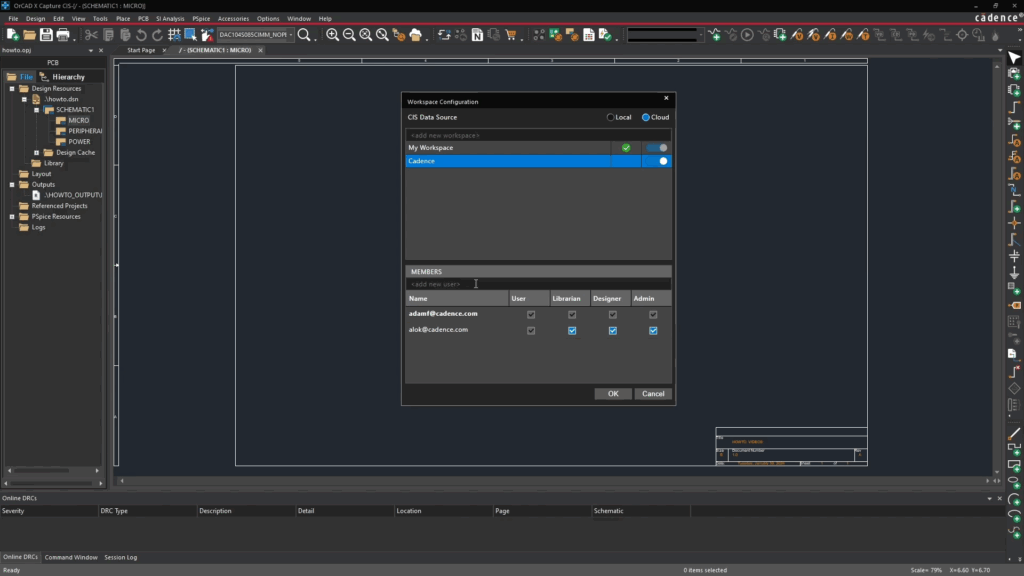
- Access Control in My Workspace: Use View → Workspace → Configuration to assign specific roles and permissions. Establish a clear rule: Only designated librarians should have edit rights for footprint and category definitions. Designers should have read-only access. This eliminates the risk of accidental manipulation of critical geometric data.
1.2. Advanced 'Life Cycle' Management
In a large library, the Life Cycle property should function as an active filter, not just a status marker.
- Define Granular Stages: Move beyond simple Draft / Approved / Obsolete. Consider implementing stages such as:
- NRFND (Not Recommended For New Design): Used for older but still available parts that are discouraged for new designs (typically due to price, lead time, or technological obsolescence). This signals designers to find a newer alternative without breaking existing designs or BOM structures.
- EOL Pending: Applied to parts where the manufacturer has announced End-of-Life, giving the team time to plan a migration.
- NRFND (Not Recommended For New Design): Used for older but still available parts that are discouraged for new designs (typically due to price, lead time, or technological obsolescence). This signals designers to find a newer alternative without breaking existing designs or BOM structures.
- Filter in Component Explorer: Configure Component Explorer to filter out EOL and Obsolete parts by default when a designer searches for new components. This ensures that designers are only presented with data suitable for current production runs.
1.3. Handling Duplicates and Data Consistency
A growing library inevitably accumulates duplicates and inconsistent entries, which threatens component data integrity.
- Standardized IPC-based Nomenclature: Review and enforce a stringent naming convention for footprints and symbols, based on IPC standards (e.g., including density levels in the name, such as
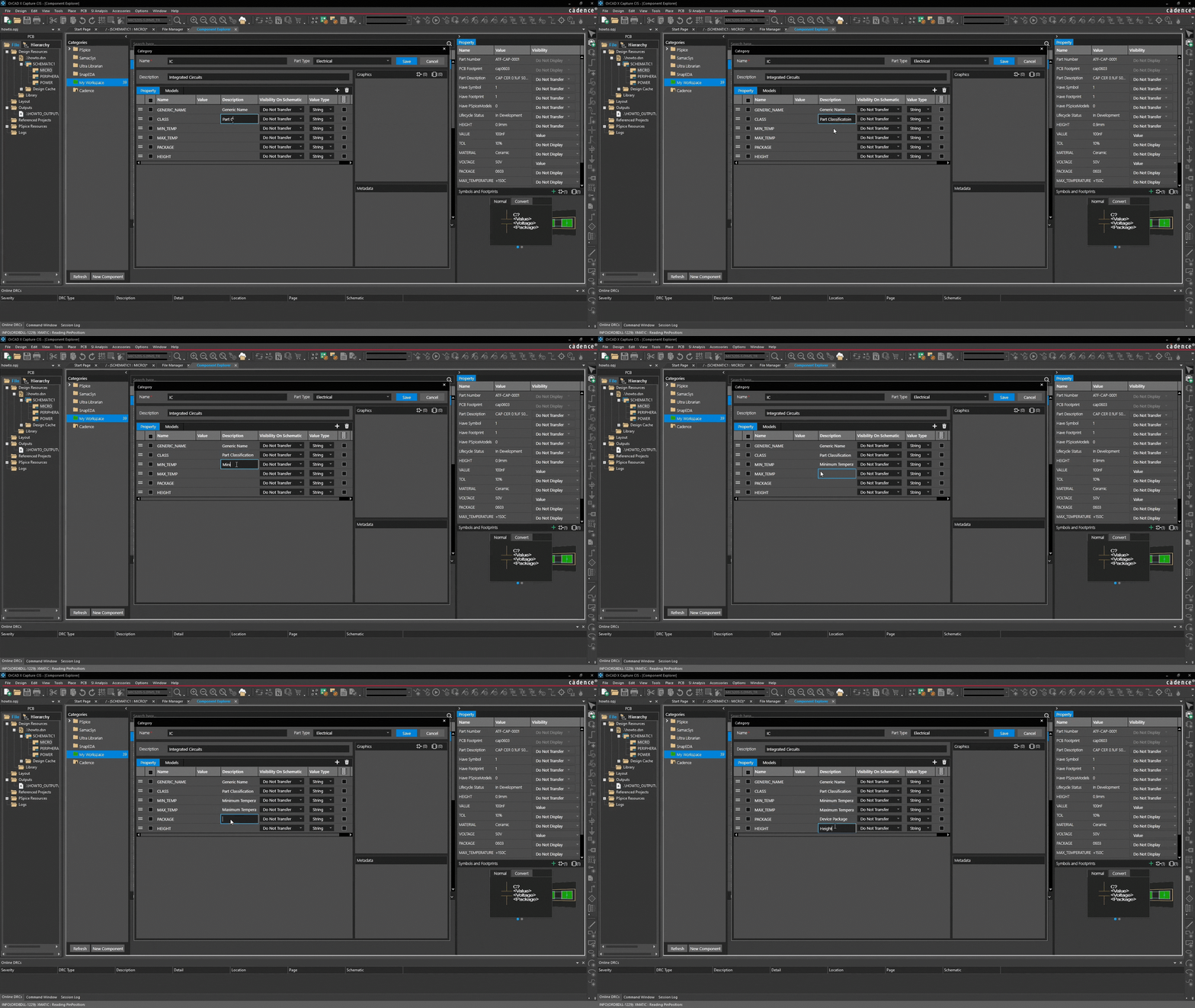
CAPC_0603_D_NOMfor Nominal Density). - Clean Up Inconsistent Properties: Use My Workspace to run a report on properties. Identify variations of the same attribute (e.g.,
TOLERANCEvs.TOL.) and ensure only one standardized version is used.
Phase 2: Optimization through Automation and Constraint Management
To maintain high 'hygiene', you must shift focus from manual checks to automated Design Rule Checks (DRC) and constraint management.
2.1. Integrate DFM Rules Directly into Footprint Definitions
The most effective footprints are those validated against production constraints during creation.
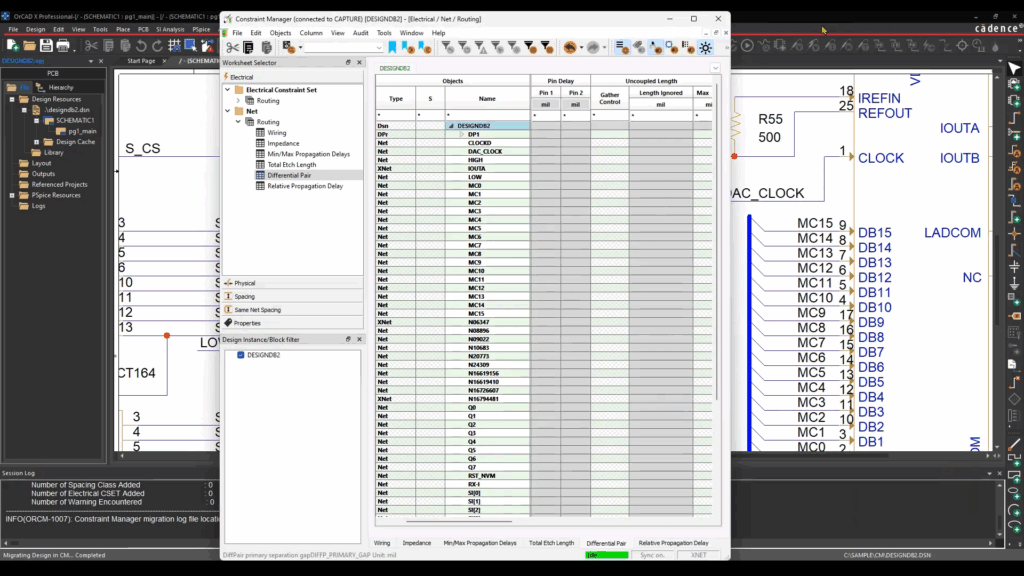
- Utilize Constraint Manager: While primarily a layout tool, footprints should be defined with OrCAD X and Allegro’s Constraint Manager rules in mind.
- Automated Pad Checks: Make it a requirement in your footprint audit process to check pad and annular ring dimensions against your Contract Manufacturer’s (CM) specifications. These rules should reflect the CM’s minimum annular ring, solder mask clearance, etc., to ensure the highest possible yield.
- Rule-based Sizing: For SMD parts, footprint sizing should be based on the density level (Nominal, Maximum, Minimum) as specified in IPC-7351B. This allows the designer to select the most appropriate version based on space and production requirements.onskrav.
2.2. Advanced Management of Component Data Integrity
Data integrity ensures that the data an engineer sees is exactly the data approved for production.
- Part Manager (Synchronization): Use the Part Manager in OrCAD X to perform synchronization checks. This tool compares parts in the current schematic with the central database.
- Function: It identifies out-of-date components (where footprints or properties have changed centrally since the part was placed).
- Value: This is the fastest way to catch errors before they reach the layout phase.
- Function: It identifies out-of-date components (where footprints or properties have changed centrally since the part was placed).
- Property Mapping: To avoid confusion during BOM generation, ensure properties from the schematic are correctly mapped to the BOM format. This confirms that Part Number and Supplier information remain consistent.
Phase 3: The Auditable Quality Assurance Checklist
Use this checklist for annual or quarterly library audits. Documenting these checks is essential for ISO certification and internal quality management.
| No. | Control point | Objective | Status |
| I. Governance & Access | |||
| 1. | Cloud Data Source verified? | Is the CIS Data Source in Configuration set to Cloud (not Local) for the whole team? | |
| 2. | Permissions locked? | Do only designated Librarians have edit access to footprints and category definitions in My Workspace? | |
| 3. | Formal sign-off? | Is documented approval (Layout + Librarian) required before footprints are set to "Approved"? | |
| II. Data Quality & Life Cycle | |||
| 4. | EOL active filtering? | Is Component Explorer configured to filter out Obsolete/EOL parts in new searches? | |
| 5. | Property standardization? | Is only one consistent spelling used for critical properties (e.g., always "Manufacturer", never "Mfr.")? | |
| 6. | Full CAD package requirement? | Is there a procedure ensuring third-party imports are only accepted with Symbol + Footprint + 3D model? | |
| III. DFM & Audit | |||
| 7. | IPC nomenclature? | Does footprint naming follow a consistent standard (e.g., IPC-7351B density levels)? | |
| 8. | DFM constraint check? | Are critical footprint dimensions (Pad/Annular Ring) validated against your CM's specifications? | |
| 9. | Template-driven values? | Are all parts forced to include critical physical properties (Package, Height) via the category template? | |
| 10. | Regular synchronization? | Does the team use Part Manager to run sync checks before sending designs to layout? | |
| 11. | No local libraries? | Have all legacy local user libraries been migrated or deleted to ensure a single Central Repository? | |
| 12. | BOM integrity? | Er property mapping Is property mapping tested to ensure Part Number and Supplier appear correctly in the final BOM? |
Turn Library Management into a Competitive Advantage
For an experienced team, optimized CAD library management is critical infrastructure that directly impacts yield and time-to-market. By systematically implementing data governance and DFM controls, you transform your library into a scalable asset.
Next Logical Step: Do you want to review your existing OrCAD X library structure with a specialist to ensure 100% compliance with industry standards? Contact us for a casual consultation.